Easily measuring inductance with Arduino
July 19, 2011 126 Comments
bidirectional analog to digital - using LM741 as comparator.
So you need to make or measure an inductor, but you don’t have an oscilloscope or signal generator? Measuring inductance with a handful of cheap common parts is certainly possible. I’ve verified this method is accurate with a scope from 80uH to 30,000uH, but it should work for inductors a bit smaller or much larger. There are some contingencies to keep in mind when it comes to measuring inductors — more on this in “Other Notes:”
There are three components that you’ll probably have to buy, but they can be picked up at your local Radio$hack: LM399 and two 1uF non polar capacitors – look at the schematic. If you don’t want to shop at radio$hack, there is a list of products at the end that should work.
No Arduino?
There is 1 digital output and 1 digital input, so this will work with most micro controllers. The output works better with a high current and uses ~33mA at 5V. The only thing left is to measure the rising edge to falling edge time on a square wave. You may want to look at the code if you’re unsure about how to enter the equations, you too can measure inductance with a microcontroller!
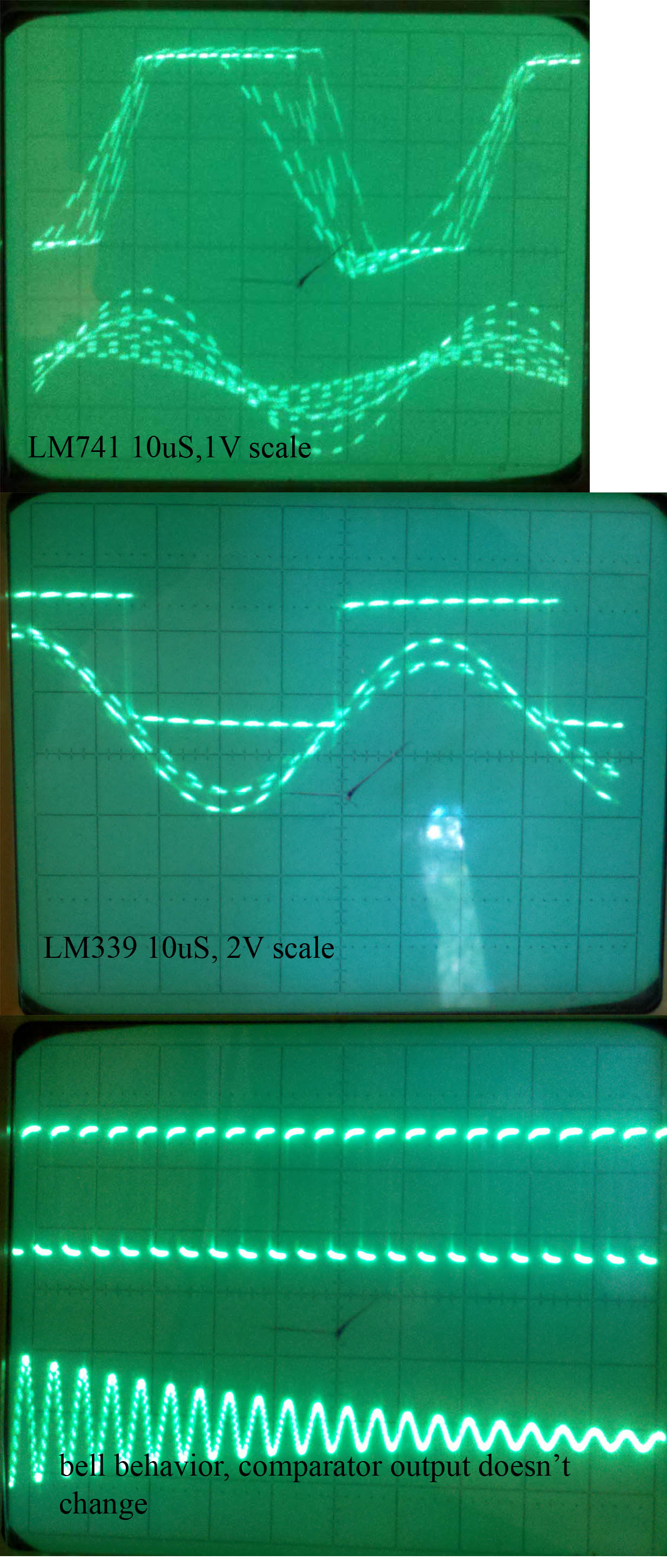
LM741, LM339 comparison and a picture showing bell like behavior.
A short lesson on the theory:
An inductor in parallel with a capacitor is called an LC circuit, and it will electronically ring like a bell. Well regardless of the frequency or how hard a bell is struck, it will ring at it’s resonating frequency. We will electronically strike the LC bell, wait a bit to let things resonate, then take a measurement. There is some internal resistance so this is really an RLC circuit, and I’ll talk about this more in the math.
Now micro controllers are terrible at analyzing analog signals. The ATMEGA328 ADC is capable of sampling analog signals at 9600hz or .1ms, which is fast but no where near what this project requires. Let’s go ahead and use a chip specially designed for turning real world signals into basic digital signals: The LM339 comparator which switches faster than a normal LM741 op amp, but there will be a schematic for the LM741 too.
As soon as the voltage on the LC circuit becomes positive, the LM339 will be floating, which can be pulled high with a pull up resistor. When the voltage on the LC circuit becomes negative, the LM339 will pull its output to ground. I’ve noticed that the LM339 has a high capacitance on it’s output, which is why I used a low resistance pull up.
Math:
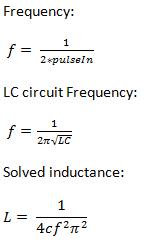
LC equations
Since our wave is a true sinusoidal wave, it spends equal time above zero volts and below zero volts. This means that the comparator will turn it into a square wave with a duty of 50%, and pulseIn(pin, HIGH, 5000); will measure the time in microseconds elapsed from rising edge to falling edge. This measurement can then be doubled to get the period and the inverse of the period is the frequency. Since the circuit is resonating, this frequency is the resonating frequency.
To the left are the equations where f is the resonating frequency, c is capacitance, and L is inductance. Solving for inductance will result in the last equation
Since this is an RLC circuit due to internal resistance, it won’t change any characteristics of the resonating frequency. The RLC will still resonate, but the amplitude will die out. With a low resistance the RLC will tend to latch onto the exact resonating frequency quicker. For you EE’s think of the frequency response of an RLC with low resistance versus high resistance.
Parts that should work:
review the circuit before buying anything. All resistors are 1/4 watt, but anything will work.
- LM741 – just search for LM741 at your favorite parts engine. here’s what I used
- LM339 – just search for LM339 at your favorite parts engine here’s what I used
- 1uF capacitor – a, b, c, here’s what I used, 5% tolerance do not use electrolytic or tantalum
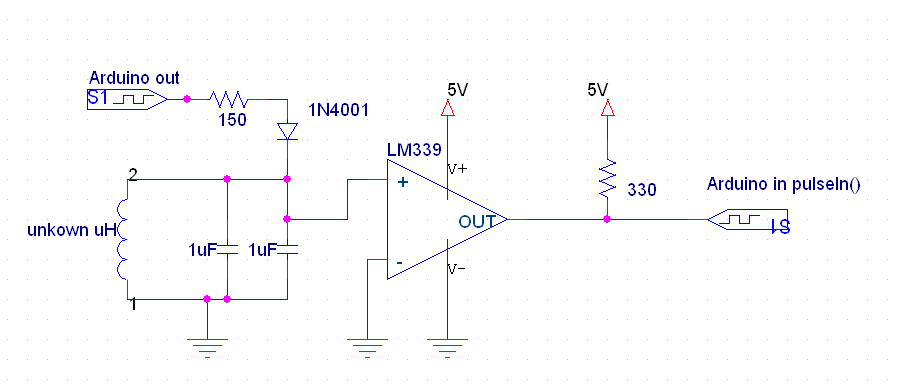
Using LM339 (works better at high frequency)
The Circuit:
Pick whichever circuit is better for you, but the one using the LM339 is better. Both the capacitors are 1uf metalized film, but anything that is non polar will work. It will need to be very close to 2 uF though. You can not use a capacitor that marks which connection is ground. One thing you may notice is that the LM741 is geared for analog computing. This means that it requires a negative voltage on it’s V- pin. If you don’t have a power supply that offers this, use two AA batteries to go 3v below ground as shown. The LM339 doesn’t need this and there is no problem inputting a negative voltage. Remember that the LC circuit will vary above and below ground. Here’s a picture of the breadboard.

Using the common LM741 op amp. D2 is a 1N4001 too.
Code:
Code for Arduino – With large inductors, you may need to increase the timeout on pulseIn() from 5000 to 10000. If you’re having issues with very small inductors – under 200uH – increase the delayMicroseconds() right before pulseIn() to a larger value ~500uS.
Other Notes:
Not accurate enough? If you look at the equation and you’ll see that the capacitor’s tolerance is key. Expect your results to be accurate within ~10% with a 10% tolerance capacitor. What does this mean? Let’s say you’re using a 10% tolerance capacitor, and the Arduino spits out that the inductor is 1000uH. Well this means that the inductor is in between 900uH and 1100uH. Think of a bell curve if you’ve taken a statistics class – most capacitors with 10% tolerance will be under 10%. (pdf)
If you require a very accurate measurement for a system running at a very high frequency, then this method is definitely not for you due to parasitic capacitance, which isn’t taken into account. This method uses low current to measure inductance, so saturation characteristics will be unavailable (measurements will be taken in an unsaturated state.) This won’t be an issue for most people.
There is this wonderful thing called permeability. Filling an inductor with certain materials changes the inductance without changing the coils. This is similar to mutual inductance in transformers. Ever notice how high frequency transformers are made with nearly non conductive ferrite, and 60hz transformers are made with an iron/steel?
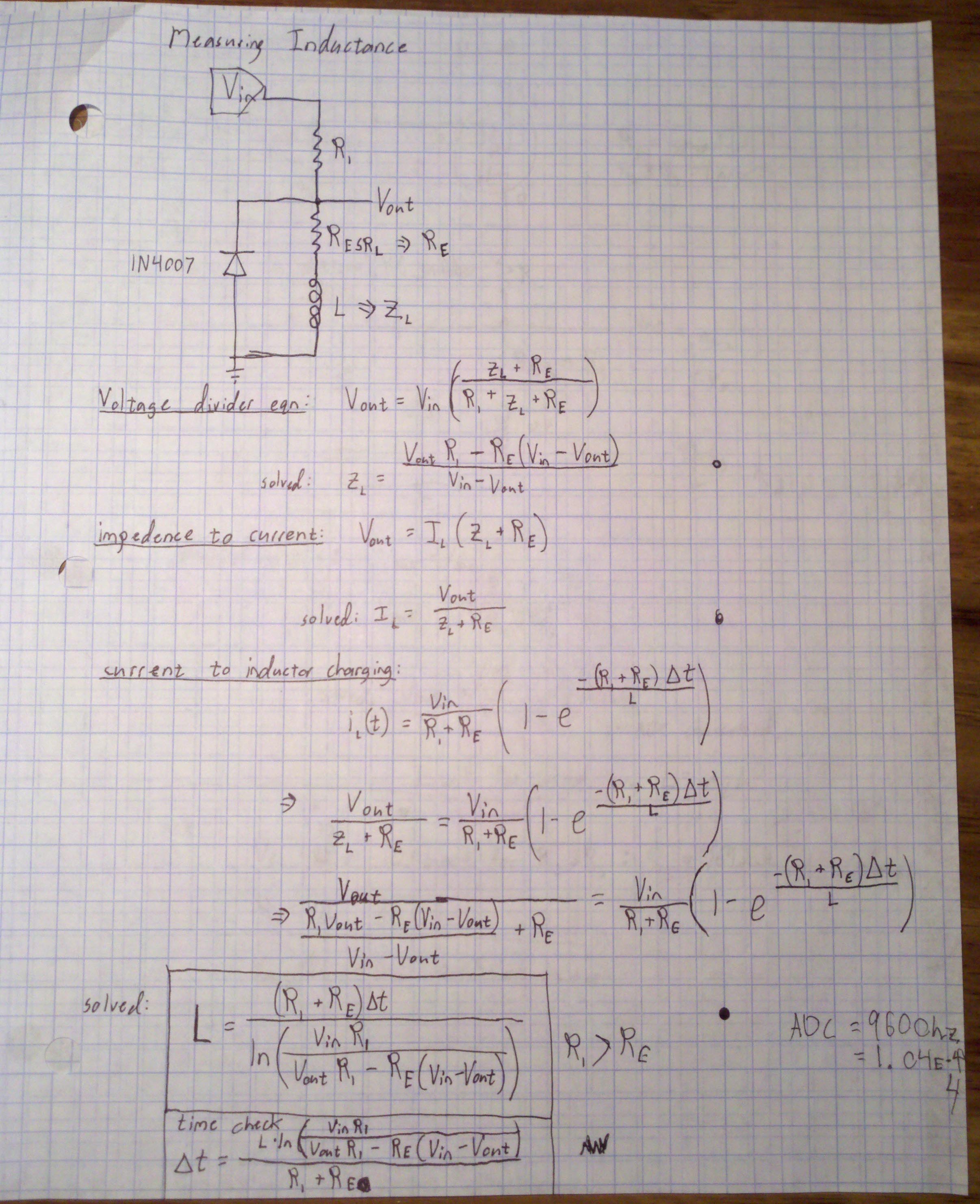
Another method that doesn't work well with Arduino.
You could make a metal detector. Inductors that don’t have closed fields — not magnetically isolated — will change their inductance when something with a different permeability than air is near.
If you have access to fast sampling rates, you can use the method on the right too, but it will require a p type mosfet to really pump some current into the inductor and R1 less than an ohm or so, but greater than the equivalent series resistance of the inductor. This method will probably run into saturation issues if the sample isn’t taken quickly, but if you’re smart about it you should be able to get information about the saturation characteristics.
And there you have it! This is the most difficult part to build on a diy LCR meter.


 ReiBot.org