Linear resistive divider for the ADC

Vdivider

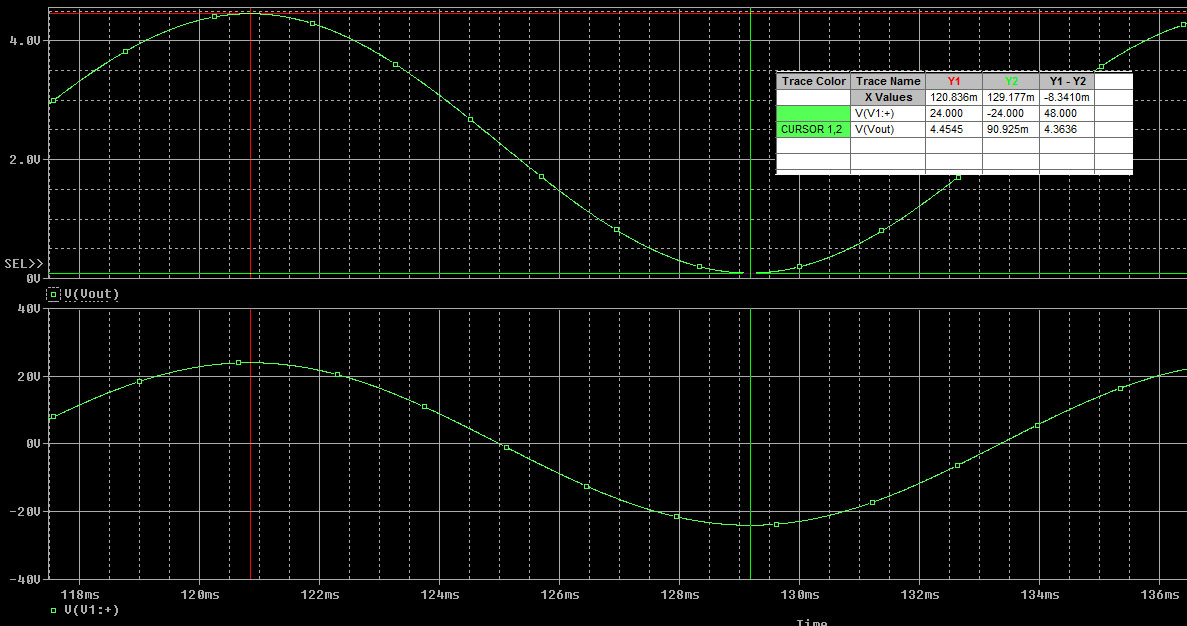
Simulation of changing -24v to 24v into ~ 0 to 5v.

This is a topic that’s very simple, but I’ve seen individuals do it in ways that are really over complicated. My example will show how to measure from -24v to 24v using a 10bit Analog Digital Converter (ADC) with an analog reference of 5v. The micro controller for this example will be an Arduino since it’s easy to get up and running. If you are having issues with selecting resistor values for your situation, leave a comment and I’ll help you out!

Design and deriving the equation:
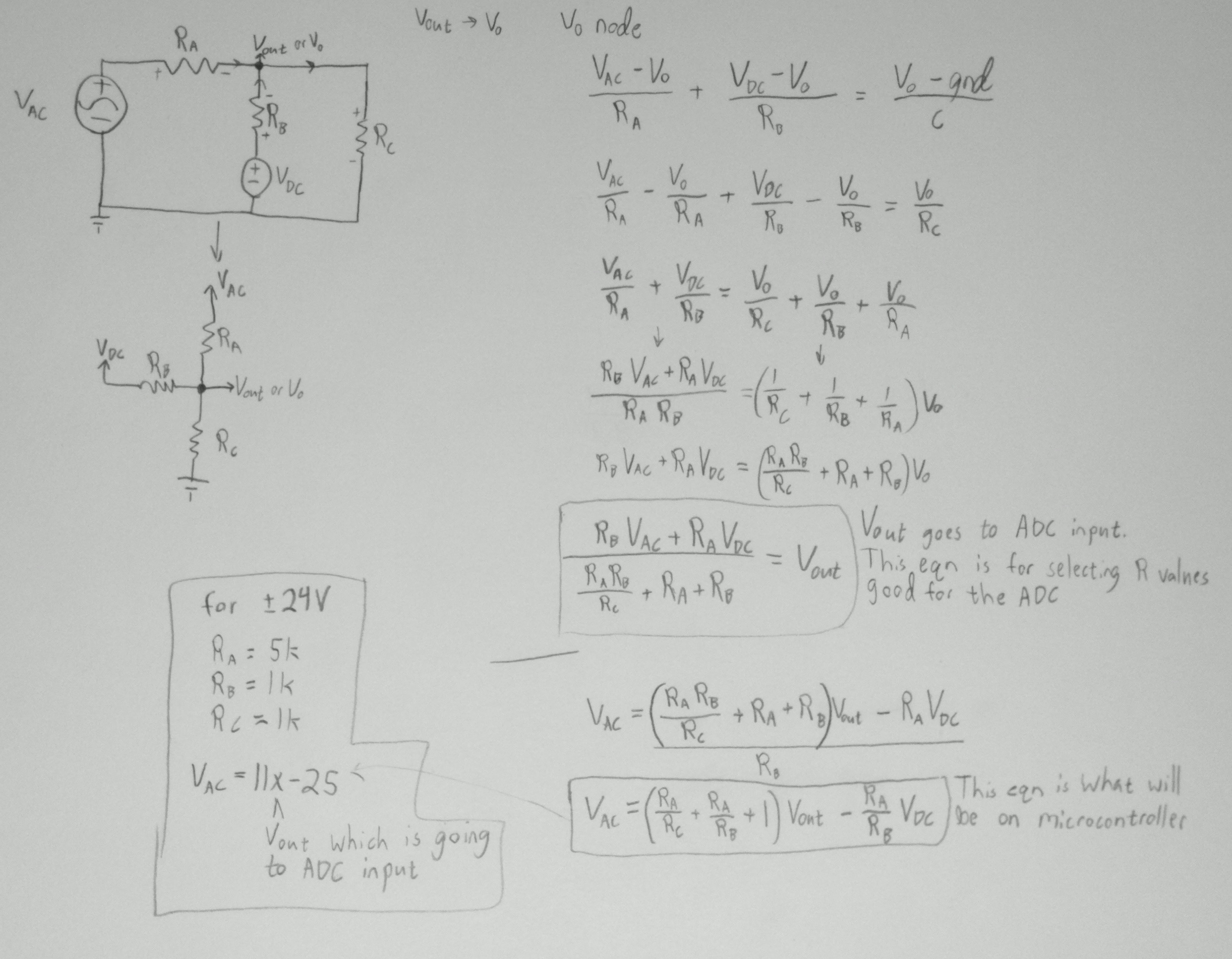
Vdivide eqn paper

Circuit and deriving the equations.

This is a circuit that’s basically an addition to the simple voltage divider which gives one the ability to measure high voltage ranges using an ADC with limited voltage ranges. I’m going to be using a voltage divider that starts out at half the Vdc, which is 2.5v for the Arduino’s 5V power. From there I’m going to use a higher valued resistor to pull the 2.5v up to nearly 5v at it’s peak positive voltage, and down to 0v for its minimum negative voltage. If you wanted to measure just negative voltages then get rid of Rc (use infinity in the equation).
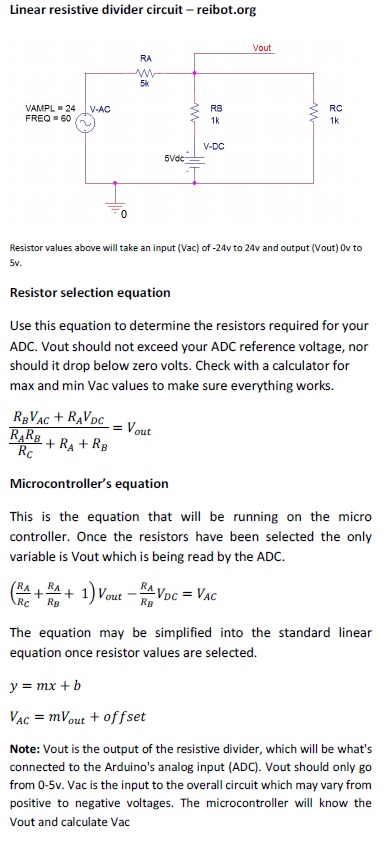
Equations required with explanation.

For deriving the equation, I just used nodal analysis. As you can see there is no calculus or anything very math intensive, but there are some variables. This isn’t a guide on circuit analysis, but if you need some tutorials on signal analysis look around youtube or try the book – Schaum’s Outline of Basic Circuit Analysis. Just as a warning there are a similar methods of doing nodal/mesh analysis that will get different equations but yield the same final equation.

Note: Vout is the output of the resistive divider, which will be what’s connected to the Arduino’s analog input (ADC). Vout should only go from 0-5v. Vac is the input to the overall circuit which may vary from positive to negative voltages. Vout may be found by using 5*(double)analogRead(pin)/1024.

Usage notes:

This isn’t a volt meter! If you build it and you’re not measuring a voltage, you’ll notice that it reports a few volts although nothing is connected. Connect Vac to Ground and you should get close to zero volts. As you can see the example above is fairly low impedance, but you can use higher resistors.
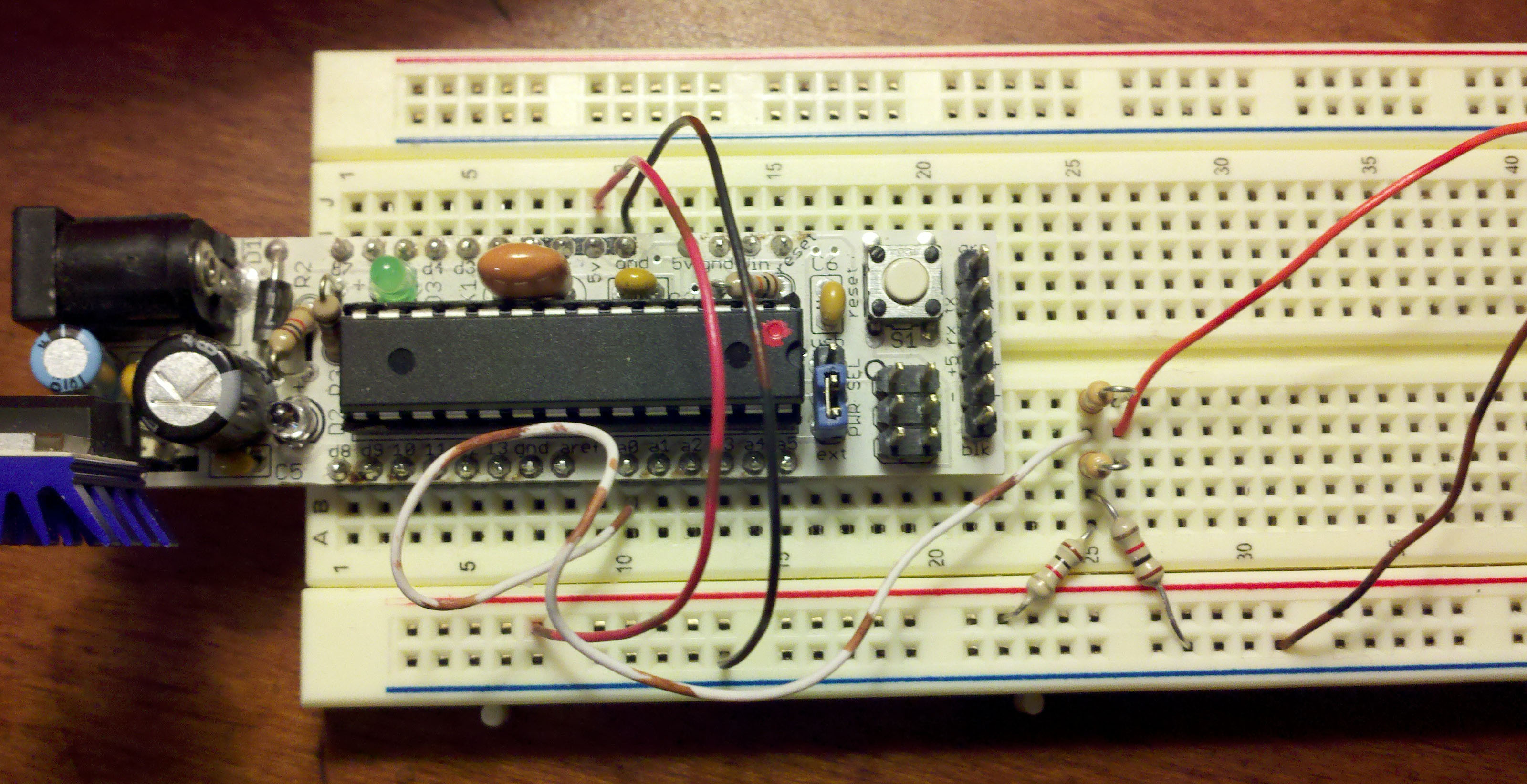
The two resistors standing up are both 10k. Two 10k resistors in parallel are equivalent to 5k. Red wire running off of picture is Vac and black is ground.

As for problems: the only thing I can think of is if the ADC wasn’t giving off good readings. If you’re measuring something that’s time critical or behaves sinusoidally, don’t put any capacitors on Vout since this will do a phase shift on Vout. If you’re worried about voltage spikes then you could use two  zener diodes facing oppositely. Also remember that in this example the voltage spread is over 24*2 = 48 volts, so with a 10bit ADC that’s 48/1024 ~ .5 volt increments.

Example code and material:

Voltage equations from above (pdf)

Arduino example program (pdf)

I was going to use this for a 3 phase triac driver with simple pwm. I needed a zero volt detector on one phase which would allow me to calculate the other phases and trigger the triacs at the right time. Originally I was going to sample the voltage with the ADC and look for about 2.5v coming to the ADC. I ended up using a simple voltage divider and a comparator which is definitely a better route! Now you can measure negative voltages with your ADC or Arduino!

Standard Deviation and Moving Average

Recently my neighbor paid me to build a key less entry system for his dorm room. I decided to go the economical route and use a button/potentiometer that sits outside the door and an Arduino on the inside that controls a servo connected to the lock. For my room, I thought it would be interesting to use a Ping))) ultrasonic distance sensor instead of the potentiometer and lose the button.

The Ping))) sensor kept taking readings while my hand was moving. In order to fix this I decided use a Moving Average filter, then calculate the Standard Deviation of the values currently included in the M.A. filter. When my hand is still, the Standard Deviation will become very small.

Example code:

M.A._and_S.D.(pdf)- “storeValue(variable);” is how to enter data into the array, then call M.A. and S.D.

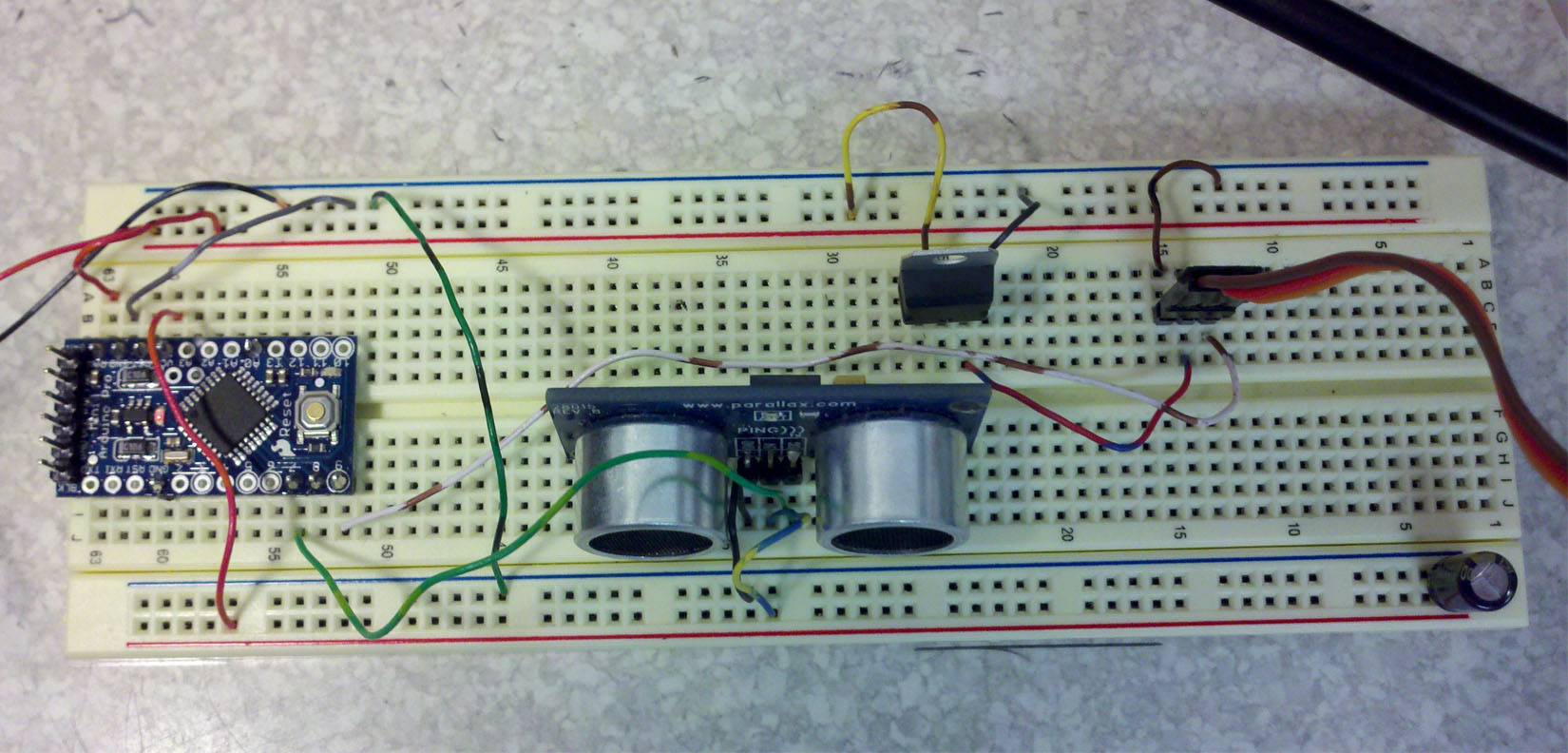
Not much of a circuit required! Arduino's regulator also powers Ping))). Servo has it's own 5v regulator... needs capacitors

pingDoorLocker(pdf) – As you can see, this program blew up a little…

Download .pde source code from RapidShare

I tried to make the M.A. and S.D. code very easy to follow. Some things could have been combined in the S.D. and Variance method, but to the beginner what I wrote above is probably easier to understand since it follows the equations. As for the pingDoorLocker – I threw that code together very quickly.

Follow up notes: That was probably the worst way to do this project… I thought of a few ways how to write the program that would chop the code WAY down, but this is an example about using M.A. and S.D.! Pretty bad use of a M.A. filter if you ask me!

His door unlocker.

Since I did put a few hours into building my neighbor’s door opener, here’s an image of it! He didn’t want numbers on the potentiometer dial, so I made the LED flash the number that is currently being entered.

Code for his door opener (pdf) – leave a comment if you want schematics/code on rapid share since pdf loses tabs.

A Beginner’s Guide to the MOSFET

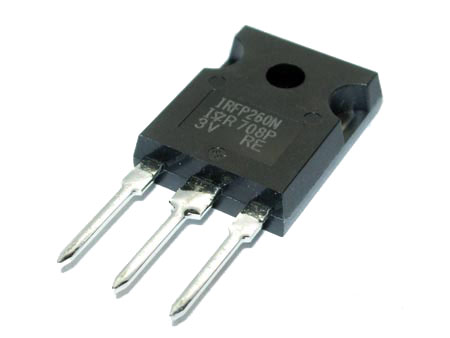
IRFP260N image from warf.com. Pins are Gate, Drain, Source from left to right.

If you need to switch high current and or high voltage loads with a micro controller you’ll need to use some type of transistor. I’m going to be covering how to use a MOSFET since it’s a better option for high power loads. This guide will be just a brief introduction that will discuss how to drive a MOSFET in a simple manner with the ultimate goal of making it act like an ideal switch. I’m not going to get into any of the topics such as Triode region, Saturation, Threshold Voltage, etc…

Refer to the N or P channel basic wiring schematics and remember the three pins: Gate, Drain, and Source. When I mention something like Gate-Source potential difference, I’m talking about the difference in voltage between the two pins.

Thank you Farnell.com for supplying many of the parts that will be part of this review/guide. I wanted to also mention that all parts performed great!

N channel MOSFET

How to think of a MOSFET:

A MOSFET may be thought of as a variable resistor whose Drain-Source resistance (typically Rds) is a function of the voltage difference on the Gate-Source pins. If there is no potential difference between the Gate-Source, then the Drain-Source resistance is very high and may be thought of as an open switch — so no current may flow through the Drain-Source pins. When there is a large Gate-Source potential difference, the Drain-Source resistance is very low and may be thought of as a closed switch — current may flow through the Drain-Source pins.

P channel MOSFET

N channel – For an N channel MOSFET, the source is connected to ground. If we want to let current flow, we can easily raise the voltage on the gate allowing current to flow. If no current is to flow, the gate pin should be grounded.

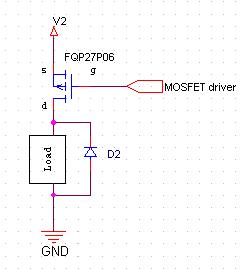
P channel – Looking at the P channel MOSFET, the source is connected to the power rail V2. In order to allow current to flow the Gate needs to be pulled to ground. To stop the current flow, the gate needs to be pulled to V2. A potential problem is if V2 is a very high voltage it can be difficult raising the gate to the V2 voltage. Not only that, but the MOSFET has limitations on the Gate-Source potential difference. Also note that logic is inverted for a P type MOSFET!

Drain-Source resistance – Ideally we want Drain-Source resistance to be very high when no current is flowing, and very low when current is flowing. The main issue using MOSFETs with micro controllers is that the MOSFET may need 10-15 Gate-Source potential difference to get near its lowest Drain-Source resistance, but the microcontroller may run on 5v or 3.3v. Some sort of MOSFET driver is required.

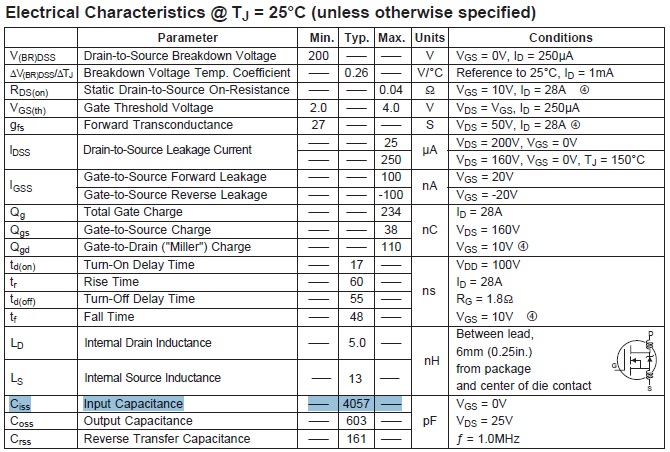
IRFP260N gate capacitance

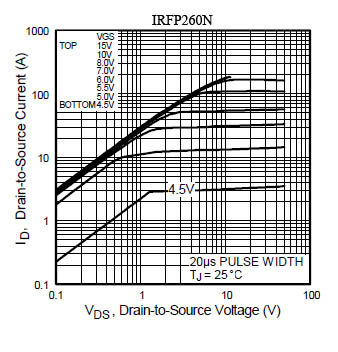
IRFP260N current curves.

Gate-Source Capacitance – There is also a capacitance on the Gate-Source pins which prevents the MOSFET from switching states quickly. In order to quickly change voltage on internal capacitance, the MOSFET driver needs to be high current. It needs to actively charge (source) and discharge (sink) the capacitor too (for N channel)!

MOSFET Drivers:

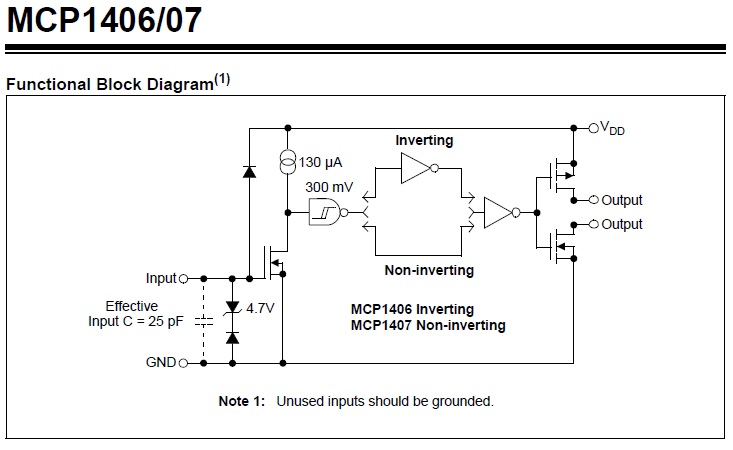
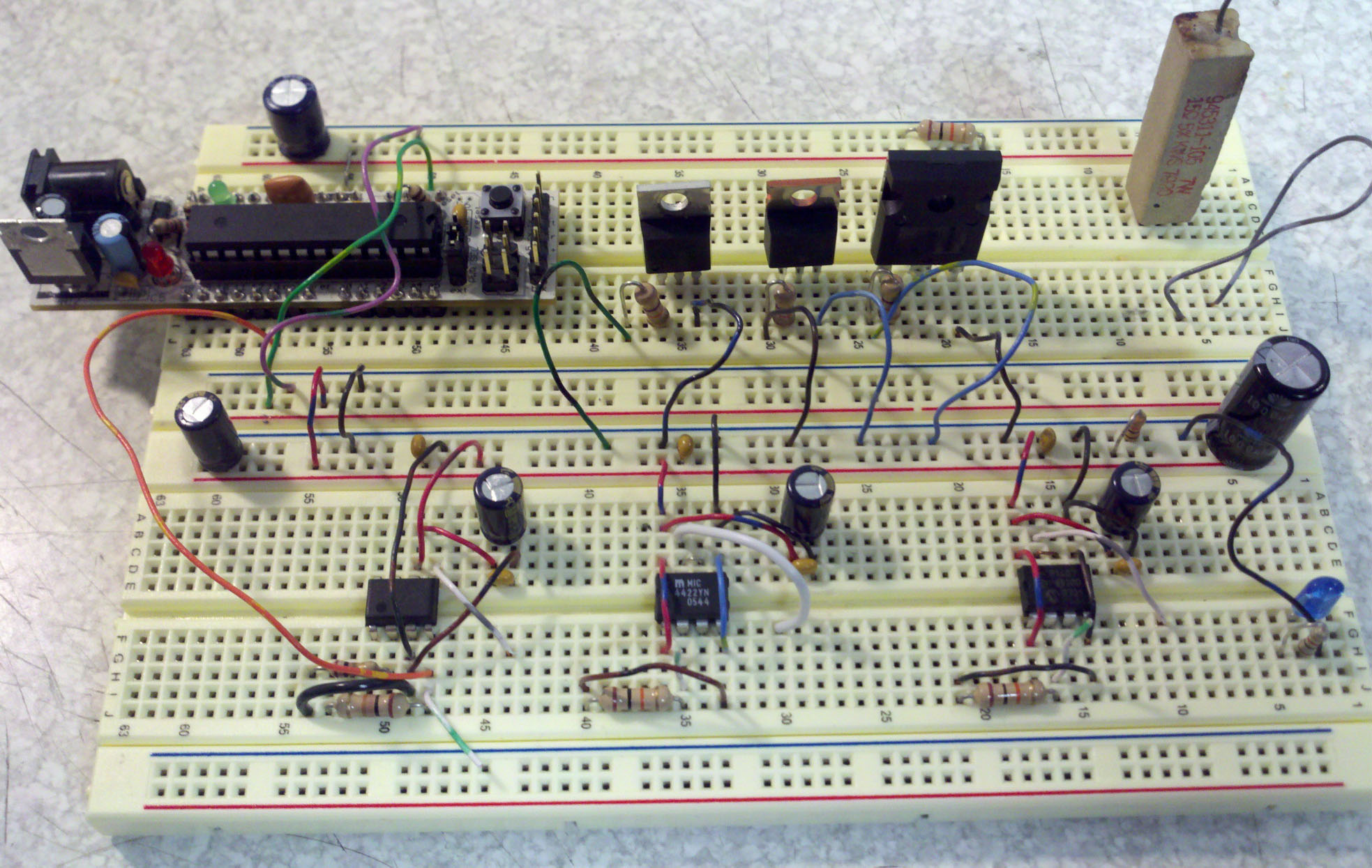
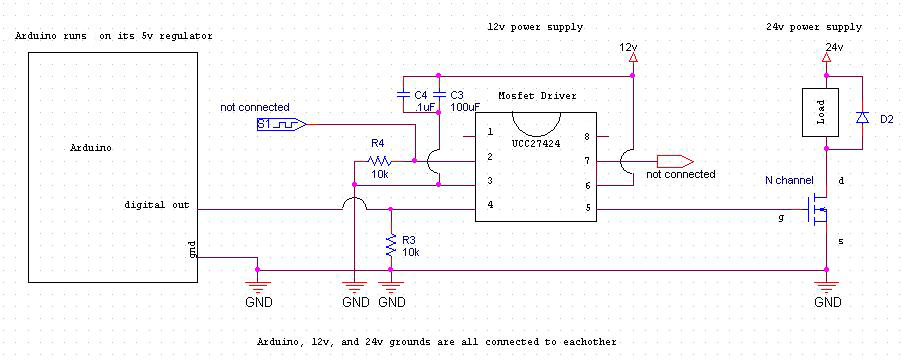
A  half bridge is capable of doing what was mentioned above! There are many ICs available which can do this. Here’s a list of just a few that I’ve tested. Schematics are also provided!

Fet driver is a Half Bridge

  • MIC4422YN – Max of 18v, 9Amps peak, 2 Amps continuous.
  • MCP1407 – Max of 18v, 6Amps peak, 1.3 Amps continuous.
  • UCC27424  – Can drive two MOSFETs, Max of 15v, 4Amps typical.

All of these drivers performed nearly identically (~20ns rise, ~30ns fall). Note that although these can be used for more than just MOSFET drivers, these chips do not have much heat dissipation capabilities!

MOSFETs I’ve tested:

It was originally part of the plan to get some data about these guys, but I have been very busy with school. The MOSFETs have plenty of graphs inside the datasheets!

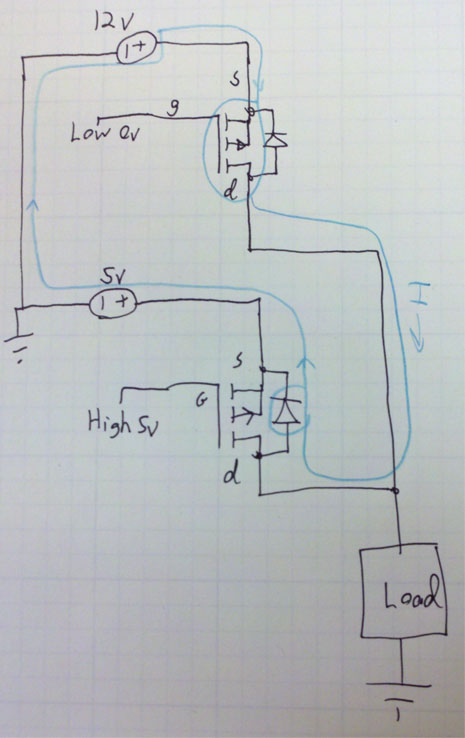
P MOSFET body diode causing unintentional current to flow.

UCC27424

MIC4422YN and MCP1407

  • IRFP260N – 200v, 50A, N channel.
  • IRF3703PBF – 30v, 210A, N channel. Misleading ratings! Read my Datasheet Notes at end.
  • RFP30N06LE – 60v, 30A, N channel.
  • FQP27P06– 60V, 27A, P channel.

An Important Reminder – Don’t forget that typically the heat sink on the back of a mosfet is connected to the Drain! If you mount multiple MOSFETs on a heat sink, the MOSFET must be electrically isolated from the heat sink! It’s good practice to isolate regardless in case the heat sink is bolted to a grounding frame.

Body Diode – Mosfets also have an internal diode which may allow current to flow unintentionally (see example).  The body diode will also limit switching speed. This won’t be a concern if you’re operating below 1mhz.

Si component generals

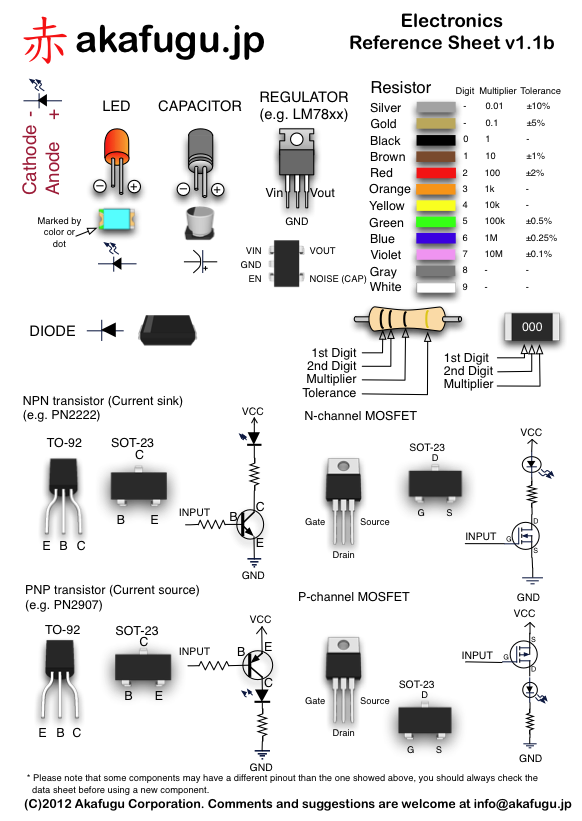
Great cheat sheet, includes MOSFETS. – akafugu.jp

Side note about Gate – Source voltage: MOSFET Gates can go above or under the source voltage. So for an N channel mosfet with a source at 0v, a -10v on the gate would allow current to flow. Verify this with your MOSFET’s datasheet!

Schematic Diode – If the load is somewhat inductive, you’ll need to put a diode to discharge the inductor. If you want more detail, look at the International Rectifier pdf at the end. My “Intro to the Boost Converter” also talks about the nature of inductors when quickly switched on/off.

Gate-Source ringing – There are a few methods that I’ve heard of / seen to limit ringing on the gate. Ringing decreases efficiency, and if excessive, can damage the MOSFET. You can use a zener and resistor in series with the zener’s cathode connected to gate, anode connected to source for N channel. P channel will have the zener flipped. Add a resistor to limit current going through the zener, and watch those breakdown voltages! There is also another diode you could look into called the TVS diode.

Datasheet notes – If a part has too good to be true ratings, check the application notes carefully. For example, the IRF3703PBF claims 210 Amps continuous drain current at 25ºC. We don’t have to do any thermal calculations to know 220 Amps is a TON of current for a TO-220 package! A closer look on page 8, note 6 reveals that it can pass a maximum of 75 Amps continuously due to the package thermal limitations. For future advice: IRF is pretty good at giving accurate ratings, but you have to look for things like this. Now in the real world lots of testing reveals if your design is bad, or if you’re working with a dishonest or incompetent supplier with inaccurate/misleading data sheets.

UCC27424, MIC4422YN, MCP1407

Mosfet Example

Arduino Mosfet Example

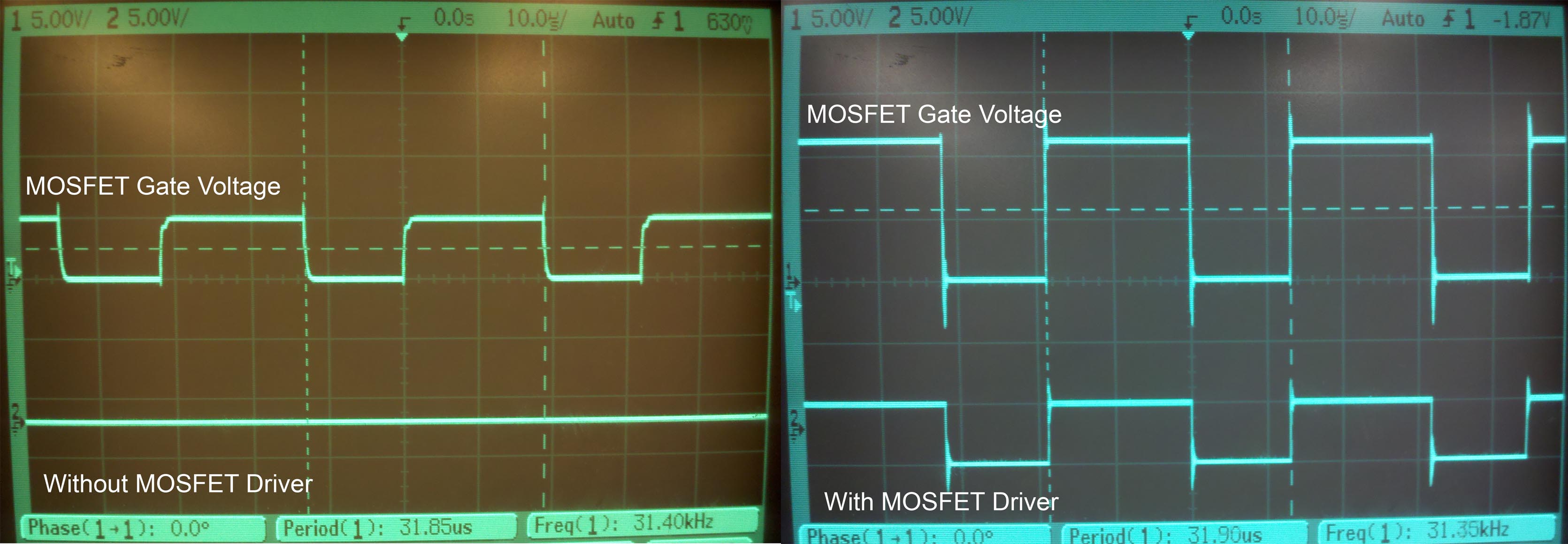
Without the driver, the Gate takes longer to charge, and it peaks at 5v. Excessive ringing due to no gate ringing suppression.

Great Additional Reading:

International Rectifier MOSFET application note

High speed MOSFET driving guide