Boost Converter Intro with Arduino

Driving some neon lights.

Let’s say that you’re trying to drive a few Nixie clock tubes, or you want to make a strobe light. A variable high voltage DC power supply from 50-200+ volts may be required. Transformers are terrific, but difficult to find the right one and a pain to wind. Why not use a boost converter? They’re easy and don’t necessarily require a guru for basic operation. This guide is meant for the individual who wants to build a simple boost converter, and may need refreshing on the theory. It will also help determine what parts will be required.

Is this guide right for you?
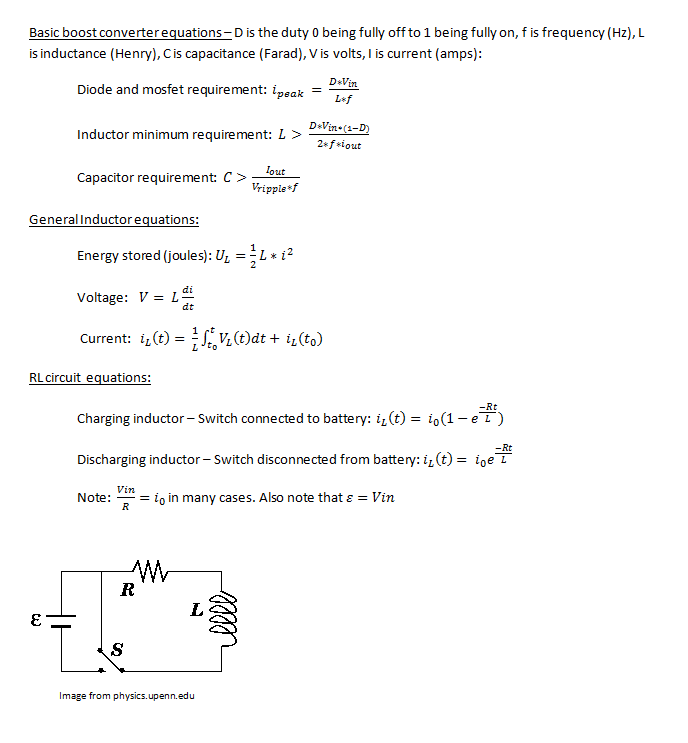
boost equations

Basic inductor and boost converter equations. D is the duty (0 fully off, 1 fully on)

Boost converters typically get less efficient as they increase voltage out/voltage in ratio. If 100+ volts are required from a 12v source, the load will need to be a fairly high impedance. Don’t expect to run a 60watt light bulb from this boost converter! If precision is required, you may want a dedicated boost converter IC which will do the job better. This guide is intended for educational purposes.

Microcontroller:

I’m going to be using, oh you guessed it — an Arduino for this example! As usual any micro controller will do (3.3v or 5v), but this project requires analog voltage reading. If your favorite micro controller doesn’t have an ADC (Analog to Digital Converter), buy one or you can make your own!

Theory:

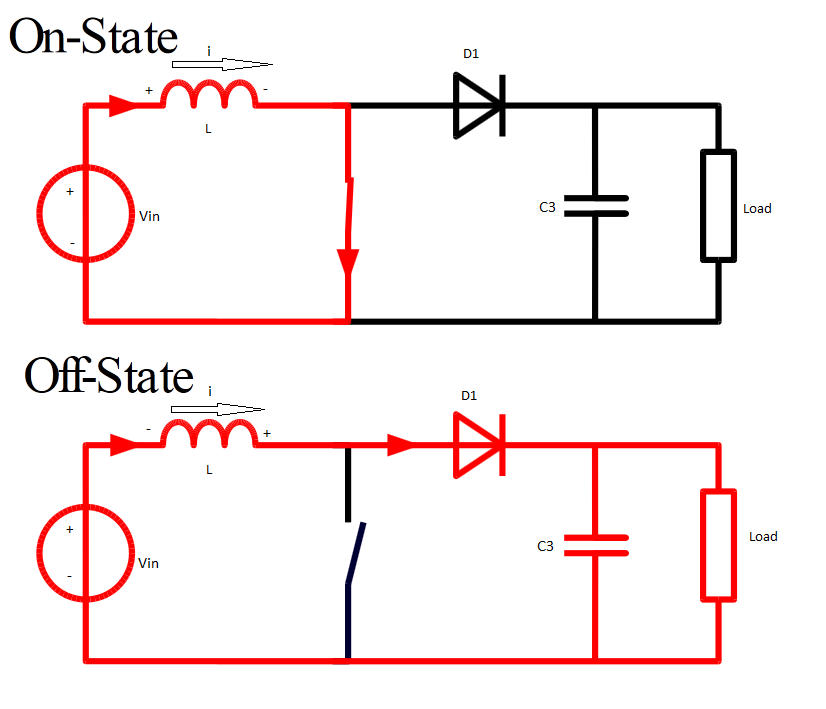
Boost converters work by taking advantage of a fundamental property of inductors: inductors use stored energy to maintain current. The key is that the inductor will vary voltage to maintain whatever current was present before the system (circuit) changed. Once the power supply is removed from a charged inductor, it may be easier to think of the inductor as an electromotive force rather than a passive component. Refer to the images to see it a bit more illustrated. Some of the key inductor equations are also listed.
boostbasicschematic

Basic overview. Original image from Wikipedia.

On state – Current can flow through the closed switch. There is a potential difference across the inductor. The fundamental property of inductors tells us that the inductor resists change in current. Initially the inductor current is near zero when the switch closes, but current will ramp up quickly as the inductor charges till the circuit goes into the Off state.

Off state – Current no longer flows through the switch. The inductor tries to maintain current, and it acts as a current source which means that voltage can sway, in this case it flips polarity due to discharge. The inductor voltage will immediately jump up to the voltage of C3 and maintain original current till the potential energy of the inductor is transferred to the capacitor. As the capacitor charges, the inductor will continue to jump up the the capacitor’s voltage, even if it’s much greater than Vin.

The Circuit:
boost converter circuit

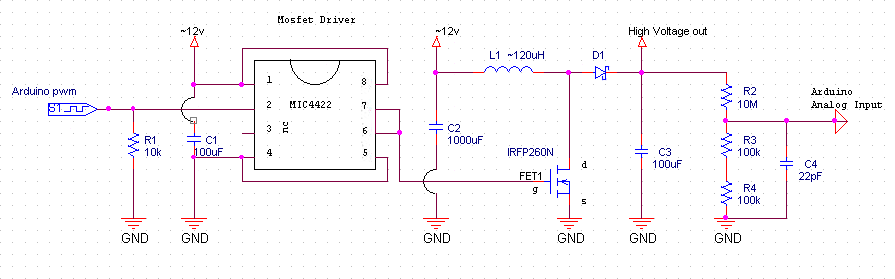
Schematic, C1, C2 are 12V. C3, FET1, and D1 must be rated for high voltage output. Arduino shares ground with this circuit. ~12v means around 12v, that’s not a negative.

The mosfet(FET1), diode (D1), and capacitor (C3) will need to be rated for voltages greater than the peak voltage. The mosfet and diode will need to have a current rating greater than the current peak — see equations. The more capacitance the better, and a ballpark number from the capacitor equation isn’t a bad idea. When it comes to duty, I would suggest not going over a .9 (230 duty for Arduino pwm) duty. If you already have a diode you want to use, then use the diode’s max current as the peak current and solve for the duty. This will be the maximum duty without damaging the diode.

Important: Mosfet Driver for the IRFP260N is required. This mosfet’s Gate-Source pins have a capacitor in parallel (downside on all mosfets). This capacitance is significant and will tend to resonate with the Arduino’s signal. This may damage the Arduino, and will dramatically reduce mosfet efficiency.
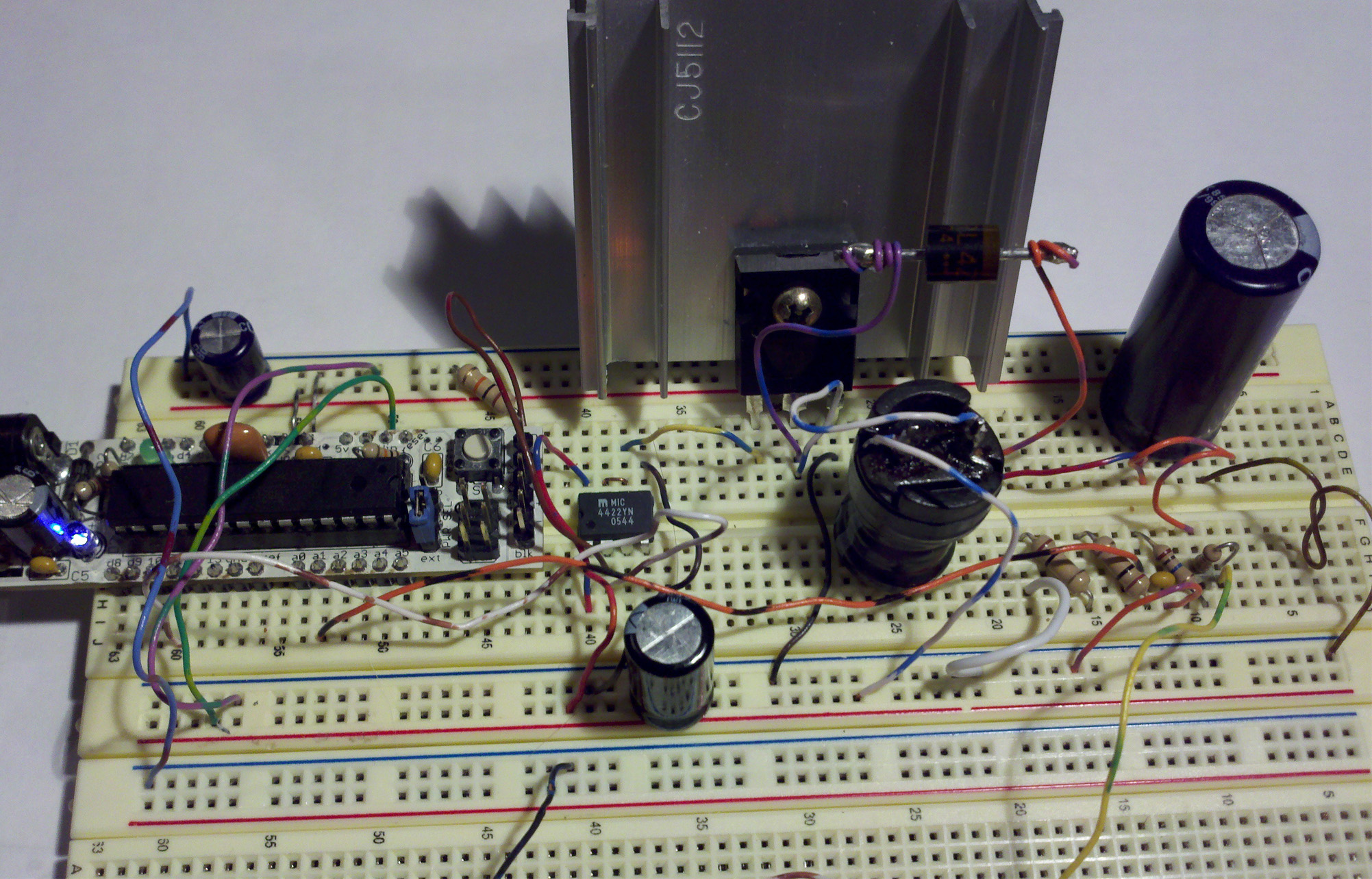
boost converter circuit

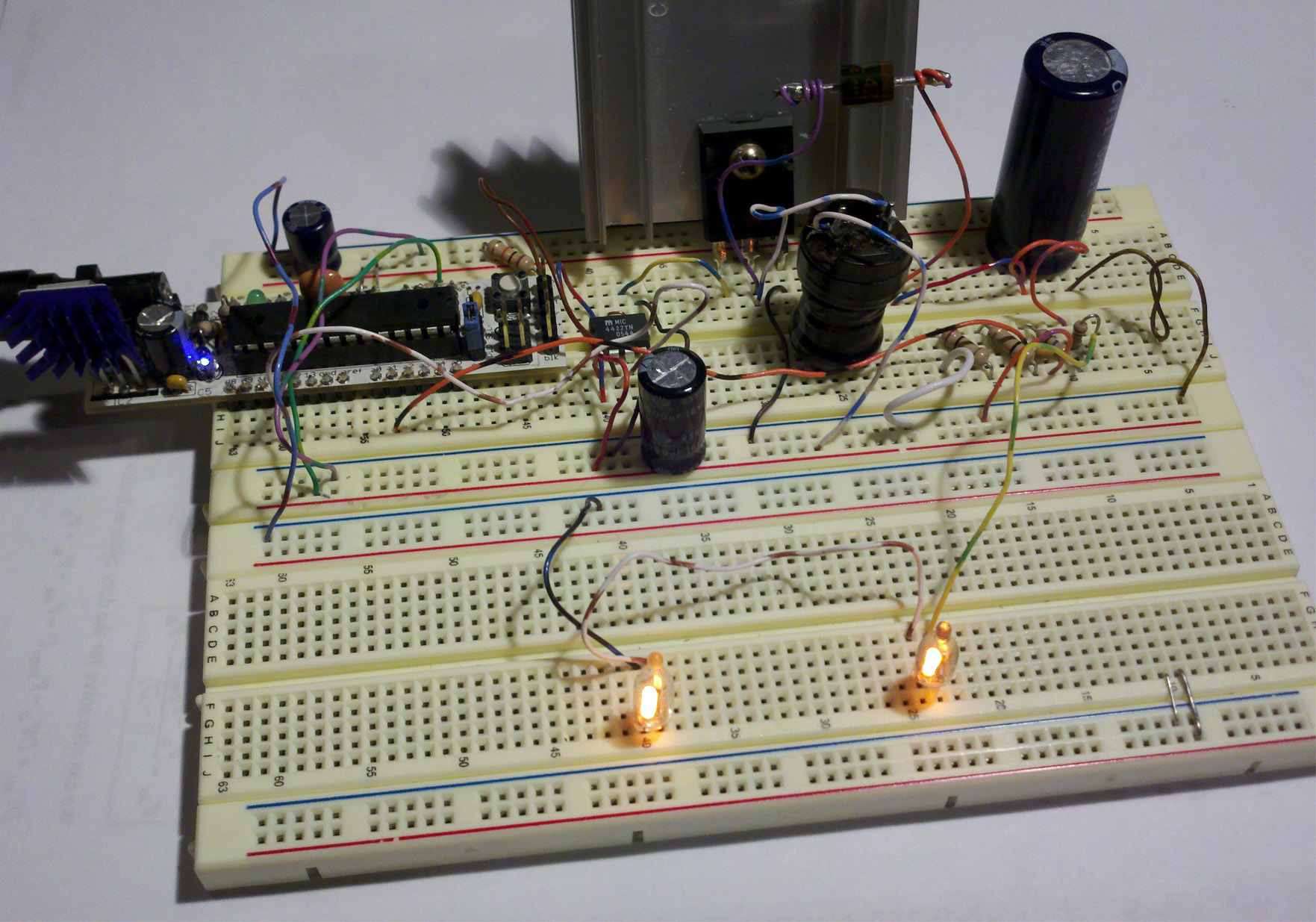
Boost converter circuit.

Frequency: My Arduino sample code will be using f = 31250 Hz pwm. It seems like any higher frequency results in a less efficient system, and 31250 hz is inaudible. This will also be using phase correct pwm – more on this in section 17.7.4 atmega328 datasheet.

Feedback: There are calculations to estimate the high voltage output, but in reality there are many factors which affect this output. I found that a feedback system works better. This feedback will output 5v when C3 is at 255 volts, and output 3.3v at 168V. If the feedback voltage is too high for the ADC, adjust the voltage divider! Look at the TI pdf at the bottom (pdf pg 9).

Selecting parts:

Here are the key components that may need to be purchased. I suggest buying from Jameco or Digikey if purchasing in the states.:

  1. Capacitor – There will need to be a high voltage capacitor – larger the better. I used a 330uF 200V capacitor that I found in an old computer Power Supply Unit. Laptop PSU (usually), computer PSU, and CRT monitors will have decent sized high voltage capacitors. Find an old CRT monitor to dig into! Check myEasy High Voltageguide to safely discharge a CRT monitor. Buy some capacitors here, or here!
  2. Diode – A regular 1N4007, but it’s not recommended and will probably fail! A Schottky diode or some other ultra fast recovery diode is much better. There are some nice diodes in CRT monitors. I’ve used the RL4Z, 5JUZ47, 5VUZ47, all scavenged from CRT monitors. Buy some here, these should work too.
  3.  N channel mosfet – IRFP260N available here or here, rated for 200v, 49A.
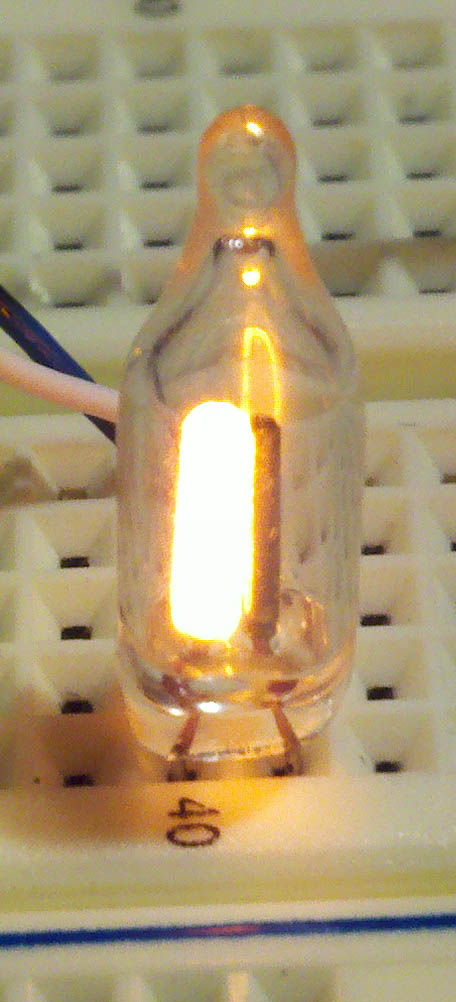
  4. Neon Light. With DC, the ground is what lights up!

    Mosfet Driver – I’ll be using the MIC4422YN. The MCP1407  or the UCC27424P should work too. If using more than 12 volts, watch the voltage requirements of these guys.

  5. Inductor – Buy or make your own inductor. I’ve used a 120uH, 871uH, 1000uH, and a 5000uH inductor with this circuit. All work fine. Larger inductors store more energy in its inductance which requires less current. The main drawback is that Equivalent Series Resistance (ESR) is higher with inductors that have many windings. When buying an inductor, watch the current rating!
Code for Arduino:

Simple code: boost code

PID code (Arduino pid library 1.0.1): boost code PID

Download .pde files from Rapidshare (down) – I’ll eventually put everything up on github. I know those pdfs are very inconvenient

Other Notes:

With boost converters, core saturation can be an issue with some designs. Remember that this design charges up a capacitor to 200V! This is dangerous and could be deadly if misused! The inductor is a current source when it’s discharging. Beginners are unfamiliar with current sources so I avoided explaining it like that.

Here’s an example of a dedicated buck/boost converter IC from sparkfun!

Handy References:

It’s always difficult knowing how in depth to go in the guides. My guide was written to get the nooblet up and on his feet. If this isn’t enough I’d suggest the links below. The TI boost guide really goes into detail.

Adafruit boost guide

Smps overview (pdf)

TI boost guide (slva061.pdf)

nixie clock from Jameco schematic
Daycounter Boost Converter guide

Wicked Laser

My initial response.

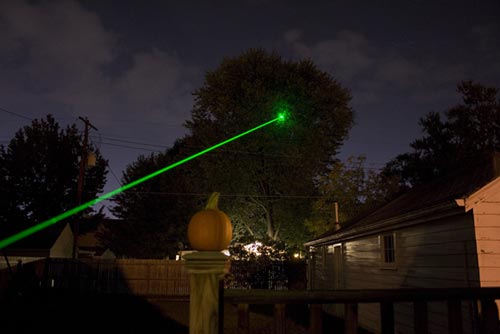
Green laser with shades to block green light.

Just received my, “Flashlight Sample” from Hong Kong. I guess it’s better than calling it a high power laser and losing it at customs. I’m certainly satisfied with seeing a clearly visible beam in just about any light condition! No smoke required! Using it to cut electrical tape like butter, and popping balloons never gets dull! Shining this thing on the ceiling literally lights up the whole room! The only downside is that there are warnings NOT to look at the dot without eye protection… how can I resist!?

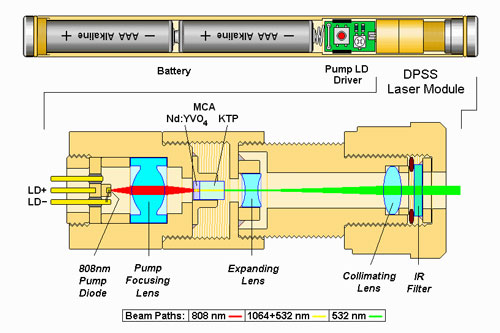
Green laser DPSS.

The legality of high power handheld laser pointers is somewhat murky and will likely change in the near future. It may be a federal crime to shine a powerful laser at the sky (who could resist doing this) since it may hit an aircraft.

How they work:

This is a Diode Pumped Solid State laser (DPSS). The actual diode inside is an infrared laser, and the light gets changed to a green color by a rather interesting, yet inefficient process. Anyway I don’t want this post to be too long, so head here if you want to learn more! I’ve read that cheap DPSS lasers don’t have the IR filter in order to have a higher power output. This must dramatically increase danger since shades probably don’t block IR too!

similar laser

Picture of a similar laser.

Future use:

I plan on putting this bad boy on a robot that will drive around popping balloons, and target tank cut outs made out of black flash paper. Another possible use is to buy a simple line camera and make a laser distance sensor.

Where to buy:

Sellers include Laser Glow, Dragon Lasers, and Wicked Lasers. I would be curious to see how well some of the laser modules from deal extreme work. Maybe I’ll get this guy!

Update:

After a year and some change the laser diode failed. Disappointing since I never went through a set of batteries! That’s a pretty good indication that the laser diode was being driven far beyond its ratings. Be warned when buying from Wicked Lasers!

Easily measuring inductance with Arduino

bidirectional analog to digital - using LM741 as comparator.

So you need to make or measure an inductor, but you don’t have an oscilloscope or signal generator? Measuring inductance with a handful of cheap common parts is certainly possible. I’ve verified this method is accurate with a scope from 80uH to 30,000uH, but it should work for inductors a bit smaller or much larger. There are some contingencies to keep in mind when it comes to measuring inductors — more on this in “Other Notes:

There are three components that you’ll probably have to buy, but they can be picked up at your local Radio$hack: LM399 and two 1uF non polar capacitors – look at the schematic. If you don’t want to shop at radio$hack, there is a list of products at the end that should work.

No Arduino?

There is 1 digital output and 1 digital input, so this will work with most micro controllers. The output works better with a high current and uses ~33mA at 5V. The only thing left is to measure the rising edge to falling edge time on a square wave. You may want to look at the code if you’re unsure about how to enter the equations, you too can measure inductance with a microcontroller!

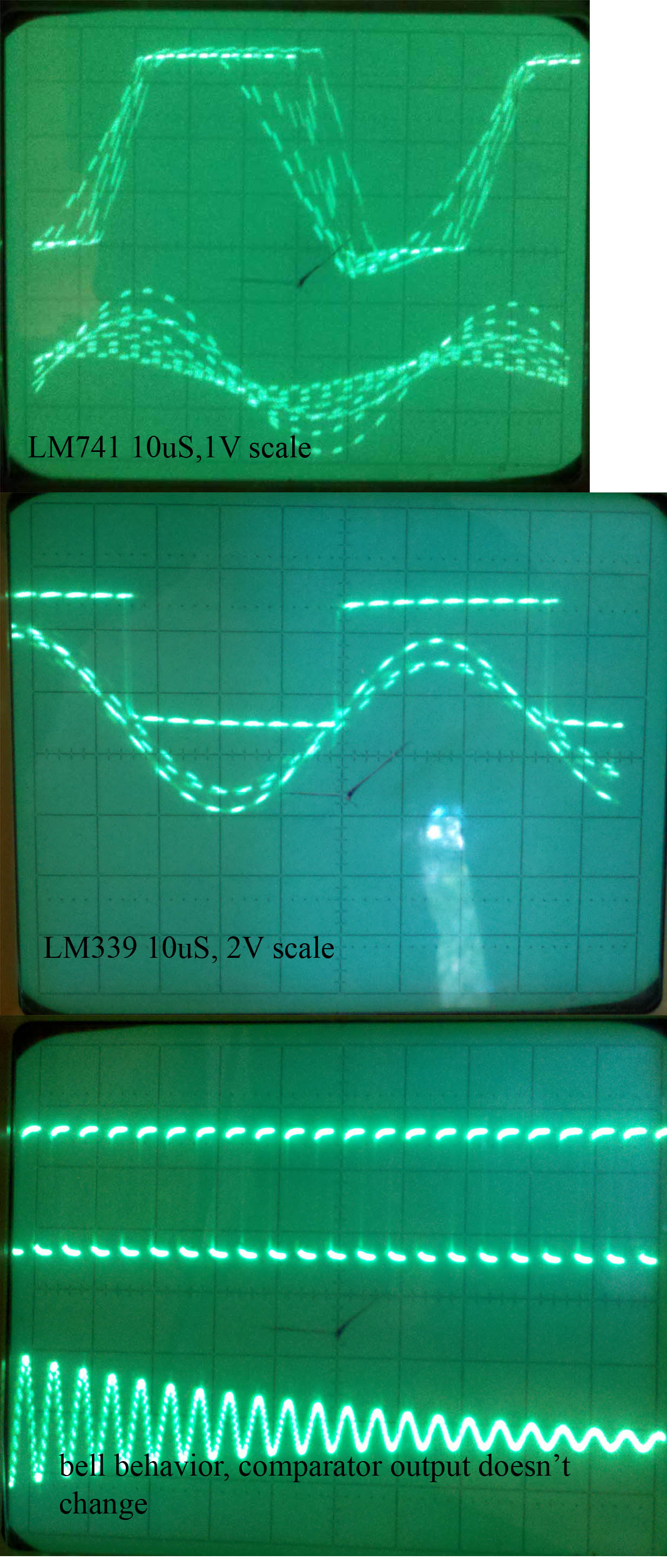
LM741, LM339 comparison and a picture showing bell like behavior.

A short lesson on the theory:

An inductor in parallel with a capacitor is called an LC circuit, and it will electronically ring like a bell. Well regardless of the frequency or how hard a bell is struck, it will ring at it’s resonating frequency. We will electronically strike the LC bell, wait a bit to let things resonate, then take a measurement. There is some internal resistance so this is really an RLC circuit, and I’ll talk about this more in the math.

Now micro controllers are terrible at analyzing analog signals. The ATMEGA328 ADC is capable of sampling analog signals at 9600hz or .1ms, which is fast but no where near what this project requires. Let’s go ahead and use a chip specially designed for turning real world signals into basic digital signals: The LM339 comparator which switches faster than a normal LM741 op amp, but there will be a schematic for the LM741 too.

As soon as the voltage on the LC circuit becomes positive, the LM339 will be floating, which can be pulled high with a pull up resistor. When the voltage on the LC circuit becomes negative, the LM339 will pull its output to ground. I’ve noticed that the LM339 has a high capacitance on it’s output, which is why I used a low resistance pull up.

Math:

LC equations

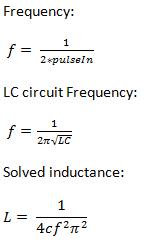
Since our wave is a true sinusoidal wave, it spends equal time above zero volts and below zero volts. This means that the comparator will turn it into a square wave with a duty of 50%, and pulseIn(pin, HIGH, 5000); will measure the time in microseconds elapsed from rising edge to falling edge. This measurement can then be doubled to get the period and the inverse of the period is the frequency. Since the circuit is resonating, this frequency is the resonating frequency.

To the left are the equations where f is the resonating frequency, c is capacitance, and L is inductance. Solving for inductance will result in the last equation

Since this is an RLC circuit due to internal resistance, it won’t change any characteristics of the resonating frequency. The RLC will still resonate, but the amplitude will die out. With a low resistance the RLC will tend to latch onto the exact resonating frequency quicker. For you EE’s think of the frequency response of an RLC with low resistance versus high resistance.

Parts that should work:

review the circuit before buying anything. All resistors are 1/4 watt, but anything will work.

LM339

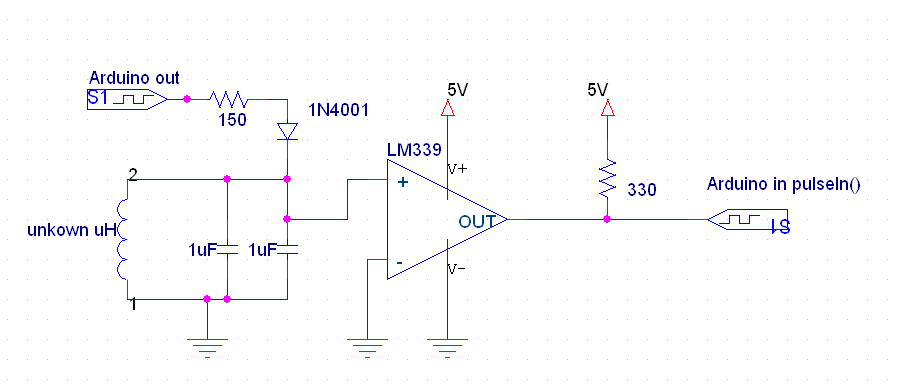
Using LM339 (works better at high frequency)

The Circuit:

Pick whichever circuit is better for you, but the one using the LM339 is better. Both the capacitors are 1uf metalized film, but anything that is non polar will work. It will need to be very close to 2 uF though. You can not use a capacitor that marks which connection is ground. One thing you may notice is that the LM741 is geared for analog computing. This means that it requires a negative voltage on it’s V- pin. If you don’t have a power supply that offers this, use two AA batteries to go 3v below ground as shown. The LM339 doesn’t need this and there is no problem inputting a negative voltage. Remember that the LC circuit will vary above and below ground. Here’s a picture of the breadboard.

Using the common LM741 op amp. D2 is a 1N4001 too.

Code:

Code for Arduino – With large inductors, you may need to increase the timeout on pulseIn() from 5000 to 10000. If you’re having issues with very small inductors – under 200uH – increase the delayMicroseconds() right before pulseIn() to a larger value ~500uS.

Other Notes:

Not accurate enough? If you look at the equation and you’ll see that the capacitor’s tolerance is key. Expect your results to be accurate within ~10% with a 10% tolerance capacitor. What does this mean? Let’s say you’re using a 10% tolerance capacitor, and the Arduino spits out that the inductor is 1000uH. Well this means that the inductor is in between 900uH and 1100uH. Think of a bell curve if you’ve taken a statistics class – most capacitors with 10% tolerance will be under 10%. (pdf)

If you require a very accurate measurement for a system running at a very high frequency, then this method is definitely not for you due to parasitic capacitance, which isn’t taken into account. This method uses low current to measure inductance, so saturation characteristics will be unavailable (measurements will be taken in an unsaturated state.) This won’t be an issue for most people.

There is this wonderful thing called permeability. Filling an inductor with certain materials changes the inductance without changing the coils. This is similar to mutual inductance in transformers. Ever notice how high frequency transformers are made with nearly non conductive ferrite, and 60hz transformers are made with an iron/steel?

Another method that doesn't work well with Arduino.

You could make a metal detector. Inductors that don’t have closed fields — not magnetically isolated — will change their inductance when something with a different permeability than air is near.

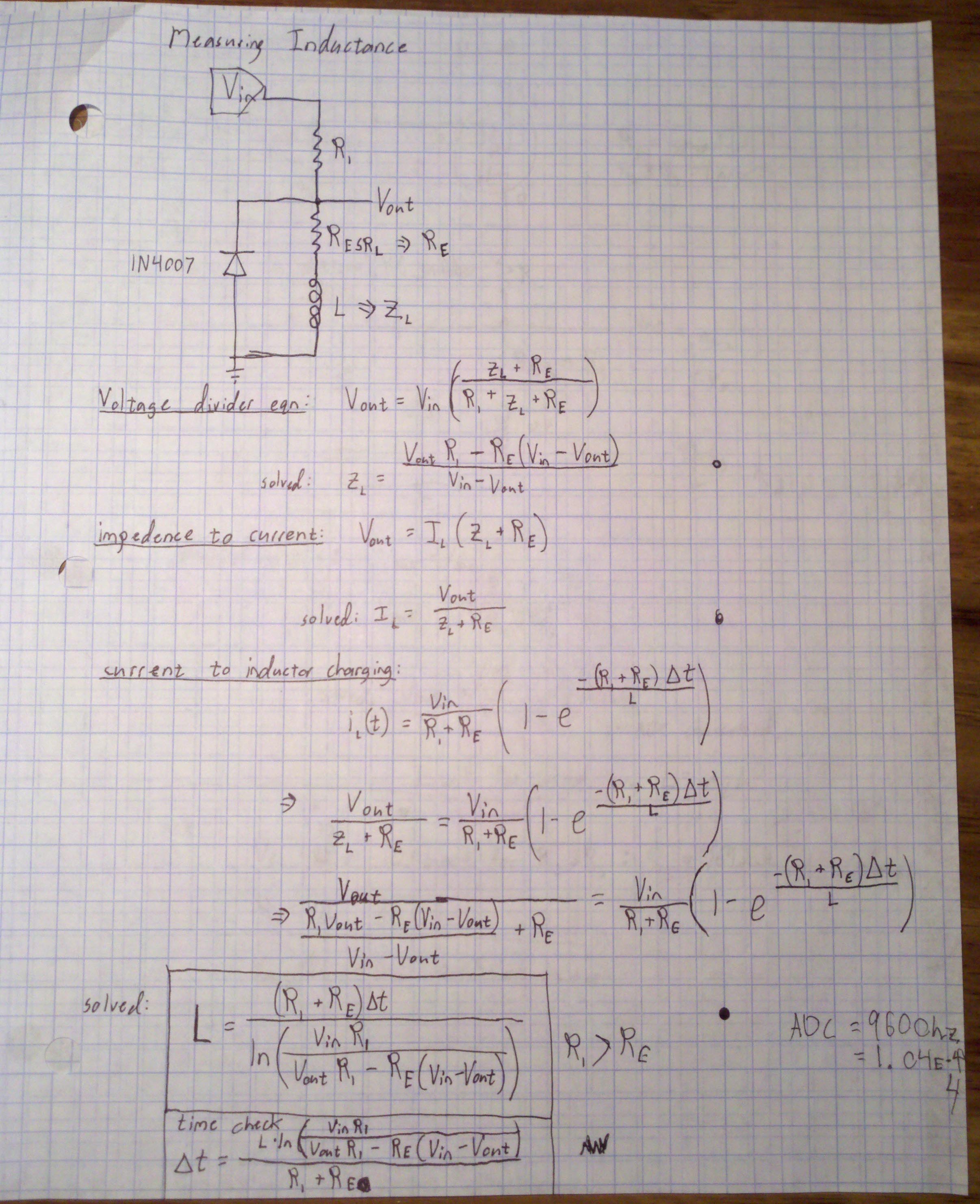
If you have access to fast sampling rates, you can use the method on the right too, but it will require a p type mosfet to really pump some current into the inductor and R1 less than an ohm or so, but greater than the equivalent series resistance of the inductor. This method will probably run into saturation issues if the sample isn’t taken quickly, but if you’re smart about it you should be able to get information about the saturation characteristics.

And there you have it! This is the most difficult part to build on a diy LCR meter.