Using the TCS3200 with Arduino or Parallax Propeller.

Image of the TCS3200 chip - from emartee

Working on a project which requires color detection, but you don’t want to bother with making your own color sensor? The TCS3200 is a great sensor offering sampling rates much higher than one made with a photoresistor. The main downfall to it is that the TCS3200-DB package from Parallax is very expensive ~ 80$ and more complicated to calculate spectral response compensation. If you’re up for some fun, make your own color sensor!

How it works:

As you can see there is an array of photodiodes with color filters on top. There are four types of filters – red, blue, green, and a clear filter. You may have noticed that there are multiple photodiodes of each color, and this helps reduce bad readings due to non-uniformity of incoming light.

TCS3200-DB package from parallax

Excluding power, TCS3200 only has 1 output and the rest of the wires are all inputs. The output is a 50% duty cycle square wave with a frequency proportional to the light intensity (irradiance) on the selected filter. There are two pins to divide the frequency of the square wave S0 and S1, and two pins to select the color filter S2 and S3. The chip works from 2.7V to 5.5V, so it’ll work fine with 3.3V or 5V micro controllers.

Wiring:

When using the TCS3200-DB with Arduino: Connect Vdd, V, and +5v to the Arduino’s 5V line, Gnd connects to the Arduino’s Ground. All other wires are on the example program.
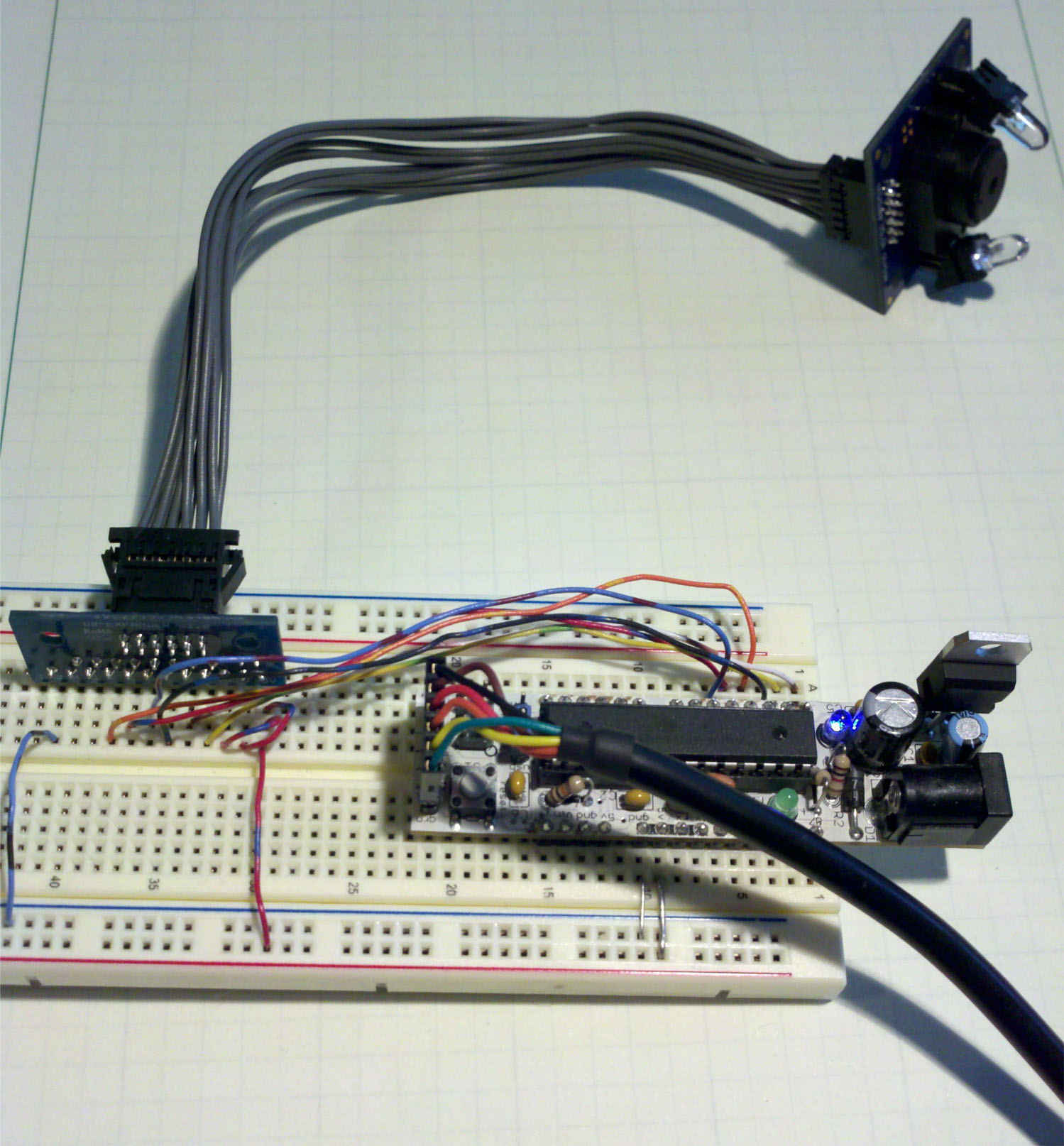
TCS3200 Wiring

Program functionality for Arduino:

The program will need to determine if there an object in front of the sensor. If there is an object present, then figure out what color it is. I will be looking at the TCS3200 output’s rising edge to the falling edge, so the less time elapsed means that there is more light. There will be some redundant readings, but this is to help ensure correct detection if anything is moving.

Take a measurement with the LED off, then compare that to a measurement with the LED on (line 53), both using the clear filter. If there was a significant difference then that means that there is an object in front of the sensor. If there wasn’t a significant difference then just return a zero (line 61-64).
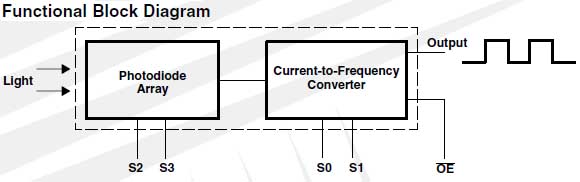
Image from TCS3200 datasheet

Take a clear filter reading and compare it with readings of each color filter, both with the LED on (line 67-72). Then do somewhat of a reverse ratio, since smaller means more light, and pick the largest reading (lines 70 – 96).

Now there will be a serial output of all the ratios and this program simply selects the largest. If you need more accurate readings instead of just the primaries, then I suggest divide the ratio with the spectral response found in the datasheet.
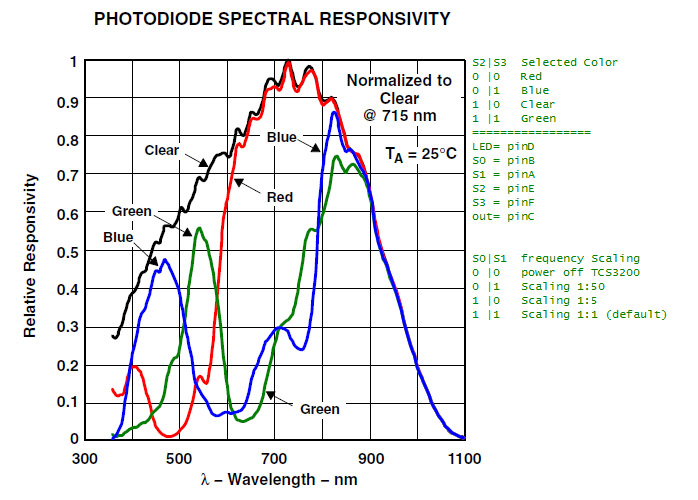
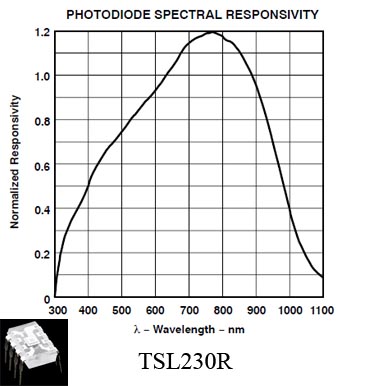
Spectral and pinout from datasheet. Note: if you're using the product from Parallax, use the spectral response from their TCS3200_doc.pdf.

There are plenty of comments in the programs below to help the user get started. there is a detectColor(TCS3200’s output square wave pin) that will return a 0 if nothing is in front of the sensor, 1 for red, 2 for blue, and 3 for green. After each reading it will power off the TCS3200 chip and LED.

I don’t fully support the Parallax Propeller, but I did write a simple program to do basic readings.

TCS3200 for Arduino with line numbers

TCS32000 for Arduino without line numbers

TCS3200 with Parallax Propeller (main.spin)

TCS3200 with Parallax Propeller (taosCountLib.spin)

Or download everything from RapidShare

ASEE 2011 Competition

Original CAD.

The goal of this project is to have a robot start on the east wall, navigate the track, collect all red doll rods, and finish touching the original east wall. The key robot rules are: robot must be fully autonomous, total budget is under 450$, the robot must fit inside an 8 x 12 x 10 inch box, and it must complete the task within two minutes. We designed the robot to be similar to an assembly line, so the robot never stops moving. Our robot ended up using a PI controller based on the Arduino PID library.

Front view, doors closed.

The batteries were only changed twice which shows how the project focused on building small modules, and shows how smoothly the final design came together. We ended up not competing due to funding issues with the school, which is why nothing was fully completed or perfected.

Member roles:

  • Moser EE- electronics, programming, control theory
  • Imig EE – electronics, control theory
  • Doxsie ME- CAD design, organization, mechatronics
  • Dulce BioE- general management, organization, paperwork

Design Stages:

The total time for this project was about seven months!

Front view, doors open.

  • Rather than rushing into any decisions, we decided to brainstorm for about two months. This brainstorming allowed team members who weren’t interested to drop out and allowed everyone else ample time to research, think of designs, test sensors, and test algorithms.
  • Next stage was to build a robot that could follow a wall, we had two robots at this time — Arduino and a Propeller based robot. Many complications arose with the propeller robot, so we ended up going with Arduino since it’s simple to use. This stage took about two months.
  • Once the team’s robot could follow a wall, it was time to navigate the course perfectly every time. This stage took about a month. A video oh another!

    Rear, doors closed.

  • The final stage was giving the robot it’s second chassis, and test one door. We then added the color detection modules. This stage took about a month, giving us plenty of time for perfection.

Programming style:

I ended up doing the majority of the programming and I’ll give a bird’s eye view on the concepts of the program.

  • Break the overall program into three stages.
  • Keep everything very modular and break up core robot functions into methods which are reused in all applicable stages.
  • Write the program in a style which contains no time based delays. If a large time based delay is needed, then store the current up time and don’t take action until the stored up time and the current up time differ by whatever the delay needs. There are some exceptions to this, but they’re under ten milliseconds.

The Arduino may do a few hundred loops a second where the actual processor just runs calculations and makes adjustments to registers, it’s not generating signals for the servos. There are large delays when the robot is turning at the corners, or at a time where it doesn’t need to be accurately following a wall and color detecting. We were originally using a compass, but a simple estimated turn is better and saves 30$.

Final ASEE robot source code (pdf) – Since we didn’t go to Canada, the code isn’t pretty.

All connections and currents.

Electronics used:

Picture of wiring. What a mess!

We did use a standard Arduino with an Atmega328. This proved to have enough pins for everything. Our Arduino was the DC BoArduino from Adafruit!

The wheels used continuous rotation servos. Doors were cheap analog servos, color sensors are the same ones that I wrote about earlier…etc. A full list of the final parts is in the pdf below.

Final robot parts (pdf)

Mechatronics:

The doll rods are much easier to work with if they’re knocked over since they can roll. I’ll admit that we used some design ideas from the other team. They didn’t knock over the doll rods and had major difficulties with actually getting the rods into their storage compartment. Their robot was based on dead reckoning, which meant there was no feedback when it came to navigating the track. Although dead reckoning is an easy path to take, it’s not ideal when tolerance is less than an inch. The video below is an older one back before we completed the color sensors. The servo in the next video is a digital all metal gear servo and it’s MUCH nicer than our final servos.

front view from robot showing pid response:

inside the cargo bay (collecting both colors):

Original robot with compass and Sharp IR distance sensor

Why are we not competing?: The tech department is funding the project, and our team is composed of engineering majors. Since we’re not from their department, they weren’t able to drop a few thousand to send us to Canada. It was frustrating since this was not explained until a few weeks before the competition!

Why didn’t we use all the doll rods?: Yes… as you can see we weren’t using all 12 doll rods. This was because the other team that dropped out still had most of the doll rods, and we didn’t have enough extras to fill up the course. We didn’t get around to making more.

One more video!

Color detection with Arduino for under 5$

Let’s say that you’re working on a project and it needs color detection. This guide will help you make a basic red, blue, green color detector that will decide if an object is present – and the color of the object. A range of up to 6cm is possible with proper guidance tubes! Let’s look at some of the options of completed sensors on the market:

The TCS3200 is a great sensor that I’ve used on Propeller and Arduino based projects, but its 80$ per sensor once shipping is paid! For the ASEE robot we needed two of these and our total budget was 450$! Since we purchased a TCS3200,  I decided to reverse engineer it and create my own! It’s a great sensor, but do we really need an adjustable lens with anti reflective coatings? It’s a bit large too…

There are two white LEDs and an array of photodiodes inside. Some of those photodiodes have color filters on them. Pulling certain pins high/low will determine which diode groups are selected — no filter, red, blue, green. The color sensor outputs a square wave and it’s frequency is proportional to the light intensity. There are also frequency multiplication pins which change the proportional constant.

Design:

There are a few different ways to do this, but I’ll cut to the chase and give you what I found to be the best. Let’s use a sensor to measure ambient light, and compare that measurement to measurements with only a powered red LED, blue LED, and finally a green LED. I say ‘sensor’ because there are many different light sensors that will fit the job.

Some of the major pros of this method is that it only needs 3 digital pins and 1 analog pin on the micro controller when using a photoresistor. If you want to use a photoresistor but don’t have analog pins, then use my “Measuring resistance or voltage with 1 I/O” post! This sensor can be built into a very small form factor with decent sampling rates less than 20ms!

Choosing a light sensor – this guide is for a photoresistor:

Choosing the LED:

  • ‘Piranha’ RGB LED – what I used because we had some sitting around looking for a nibble.
  • RGB LED – another LED that would be great.
  • Just use 3 separate bright LEDs

    Schematic: Click to enlarge

The build:

The Piranha RGB LED is a bit different than we might expect. In order to turn on the red LED we’ll need to pull the blue and green pins HIGH, then pull red LOW. Only one LED at a time may be lit, otherwise the LED with the lowest threshold voltage will probably be the only one to light.

This design will use 19mA per sensor. Two sensors may have their LED lines tied together since the Arduino is capable of sourcing/sinking 40mA. Each color sensor’s photoresistor (output) will need a dedicated ADC pin on the micro controller.

Important:

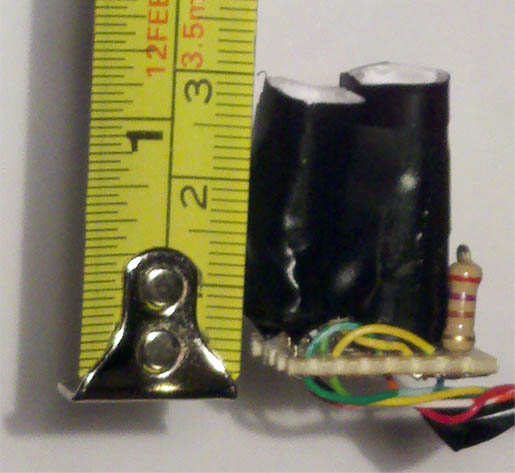
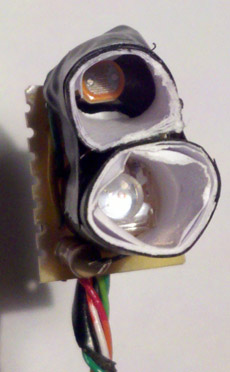
Photoresistor tube is shorter.

Isolate the LED and photoresistor by using white paper tubes wrapped in a layer of electrical tape. Cut the tubes so that they’re

Black tape behind photoresistor

about 2-3cm long and fit one on the LED and put the other on the photoresistor with a black piece of tape stuck to the back of the resistor. You want to block as much light as possible on the back end of the photoresistor.

Improving results:

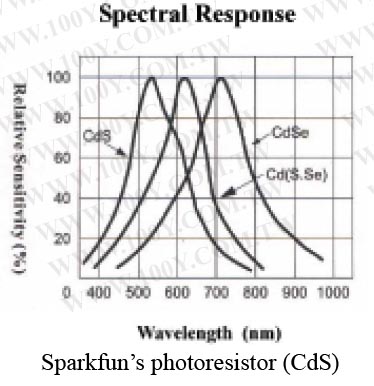
Here’s a way to get a rough calibration: The wavelength for the Piranha is Red: 630nm, Green: 525nm, Blue: 470nm. Now look at the spectral response for your sensor. We can make software corrections to the measurements at the LED’s wavelength. I would suggest doing a constant multiplication to the reading to get all readings to 100%. The color detection ran well enough that I didn’t need to do this for my project.

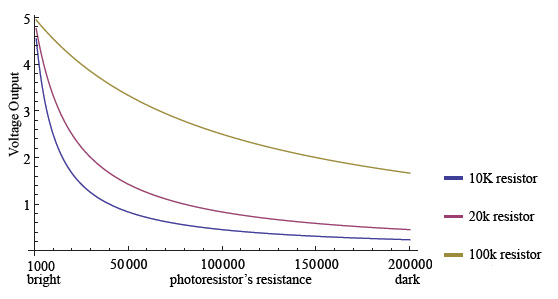
In the schematic above a 10k Ohm resistor was picked mostly because that size worked well for me. The resistor value depends on the light levels and the tube length you’re going to be working with on your robot. A longer tube increase range, but decrease overall light values. This will require a resistor around 20k.  Mainly you’ll want to put one of the photodiodes in the tube prior to the build and put it in the environment you’ll be using it in. Here’s a graph that will explain why.

My photoresistors to up to 200k in pitch dark! Graph made with WolframAlpha

Let’s say that we want the sensor to be very directional and view a far ways away. Since the photoresistor is deep inside a tube, it won’t be exposed to much light. Since it’s probably operating past 100k ohms, if the resistance changes to 150k ohms, then the voltage will hardly change at all when using a 10k grounding resistor. Don’t forget that there are only 1024 segments with the on board 10bit ADC! You’ll want to use a part of the graph which has a large negative slope (left side). The right side of the graph will be difficult for the microcontroller to interpret when using small resistor values. A 100k resistor will have a small negative slope, but it’s distributed all over the graph. If you want to adjust the resistance after the project is already done: just add resistance to the ground pin of the sensor. The ground pin connects directly to the 10k resistor, and nothing else uses it. Remember that resistors in series is just the sum of the individual values.

You could also think of this in terms of curvyness, so curvature will be small, then large, then small. Don’t go past the large value for curvyness. Methods exist to calculate curvyness but not necessary. If you’re interested it’s on page 833 of James Steward – fundamentals of calculus 6th ed.

Alternative designs:

You could use four possibly three photoresistors and have colored filters in front of them. Then a white LED to look for reflectivity. This method is more difficult to calibrate, and would require three to four analog pins with one digital pin for the LED.

Code for Arduino:

Color Detection code (pdf)